As my banking provider keeps my transaction history for 10 months only, i was looking for alternatives to fancy apps – one that helps you easily organize your budget and can be self-hosted and maintained manually. I’ve tested both, FireFly III and Actual Budgtet. While both offer ‘bank-sync’ features, it was important for me to import bank statements easily and control access. FireFly III is more complex and requires its own firefly-iii/data-importer, whereas Actual Budget simply takes my CSV files and parses them according to my configuration. So, Actual Budget it is!
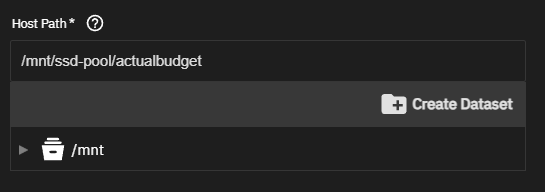
Installation is pretty straight forward. For backup/restore purposes create a own storage path. First create a separate dataset in TrueNas and then assign the App privileges to it, you can now select it in the Host Path configuration for the Actual Budget App.
Actual Budget data directory explained (backup & restore)
Actual Budget stores its data in a single directory. To back up or restore correctly, it helps to understand what each file is used for.
Directory layout
actualbudget/
├─ .migrate
├─ server-files/
│  └─ account.sqlite
└─ user-files/
   ├─ group-<id>.sqlite
   └─ file-<id>.blob
File descriptions
.migrate
Used internally to track database migrations.
Not required for restore, but safe to include.
server-files/account.sqlite
Main server database. Stores users, authentication data, encryption keys, and budget metadata.
Required for restore. Losing this file means losing access to all budgets.
user-files/group-<id>.sqlite
Budget database. Contains all transactions, accounts, categories, payees, and budget history.
Each file represents one budget.
Required for restore.
user-files/file-<id>.blob
Binary storage for attachments and imported files.
Optional. Budgets will work without it, but attachments and some import data may be lost.
Minimum required backup
server-files/account.sqlite
user-files/group-*.sqlite
Recommended Backup & Restore notes
Back up the entire actualbudget/ directory to ensure a complete restore with attachments.
truenas[~]$ sudo rsync -rv /mnt/ssd-pool/actualbudget /mnt/.ix-apps/app_mounts/actual-budget-restore-test/data

sending incremental file list
actualbudget/
actualbudget/.migrate
actualbudget/server-files/
actualbudget/server-files/account.sqlite
actualbudget/user-files/
actualbudget/user-files/file-b66612c1-e78d-4b3f-a0ce-d2090989781e.blob
actualbudget/user-files/group-4c34ec86-c85f-4753-b153-f0bb1ea880ca.sqlite
In the example i’ve just create another instance of acutal budget and did a backup/restore test at once.
Note: Stop the ‘Actual Budget’ container before restoring files. After restore, ensure file ownership matches the container user, then restart the container.