“It’s not AI that’s the threat, it’s the person who masters it before you do.”
This guide condenses professional prompt-engineering best practices into a single, reusable
framework. It is designed for fast reference when generating consistent, high-quality images with
Nano Banana and similar models.
The 6‑Component Prompting Strategy
Every effective prompt should explicitly define six components as follows:

SUBJECT → ACTION → ENVIRONMENT → ART STYLE → LIGHTING → DETAILS

This hierarchy reflects how image models resolve scenes: identity first, then composition, then rendering quality!
Component Definitions (My Quick Reference)
- Subject
Defines who or what appears. – Identity, age, gender – Reference locking (same face / hairstyle)
Example:
19‑year‑old male, same face and hairstyle as reference image - Action
Defines what is happening. – Pose, gesture, interaction
Example:
seated upright, holding a miniature figurine, pointing a fine brush - Environment
Defines where the scene exists. – Location, layout, spatial context
Example:
clean modern art studio, wooden workbench, minimal tools - Art Style
Defines how the image is interpreted visually. – Use one dominant style only
Example:
photorealistic, cinematic editorial photography - Lighting
Defines how form and depth are created. – Contrast, direction, rim/fill usage
Example:
low‑key studio lighting, soft key light, subtle rim light - Details
Defines quality control and constraints. – Resolution, depth of field, exclusions
Example:
shallow depth of field, high resolution, no distorted anatomy
Prompt Engineering Side Quests (with Nano Banana Example)
- Camera Framing Control
Use photography terms to lock composition and perspective.
Example:close-up, eye-level, three-quarter view portrait - Facial Expression Locking
Explicitly define expression and gaze to avoid drift.
Example:neutral-to-confident expression, direct eye contact - Lighting Definition
Specify lighting style, contrast, and intent for mood control.
Example:soft key light, cinematic contrast, subtle rim light - Background Behavior Control
Tell the model how the background should support the subject.
Example:background softly blurred, non-distracting - Identity Consistency Constraints
Preserve defining traits when using reference images.
Example:maintain same facial structure and hairstyle as reference - Action & Pose Precision
Describe actions clearly with body mechanics.
Example:left hand holding figurine, right hand painting - Spatial Relationship Mapping
Define where objects sit relative to each other.
Example:figurine centered on transparent stand on desk - Wardrobe & Material Anchoring
Stabilize realism with specific clothing, materials, and colors.
Example:navy cotton shirt, beige trousers, leather shoes - Style Constraint Minimization
Avoid conflicts by limiting stylistic instructions.
Example:single cinematic aesthetic, one lighting style - Text Rendering Instructions
Control readability with typography rules.
Example:bold sans-serif text, uppercase, high legibility - Negative Constraints
Suppress common generative errors explicitly.
Example:no extra limbs, no distorted anatomy - Logical Consistency Checks
Remove contradictory instructions before generation.
Example:seated upright, frontal orientation - Output Quality Parameters
Finish with technical and rendering constraints.
Example:photorealistic, shallow depth of field, high resolution
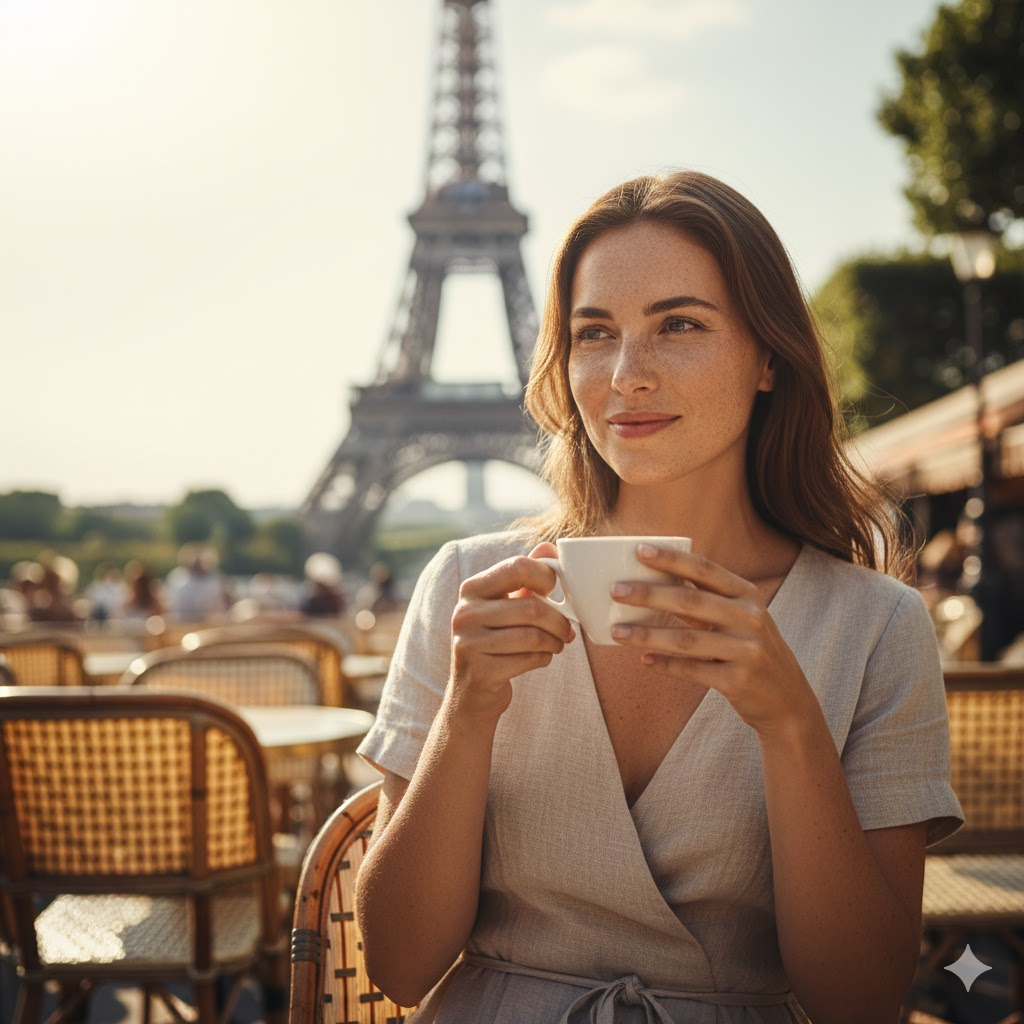
Subject & Identity
A woman with natural freckles across her cheeks and nose, realistic facial proportions, consistent facial structure.

Camera Framing & Angle
Medium shot, eye-level, three-quarter view.

Facial Expression & Gaze
Relaxed, content expression with a subtle smile, gaze slightly off-camera.

Action & Pose
She is holding a ceramic cup of hot coffee with both hands, gently lifting it toward her lips.

Environment & Location
Outdoor Parisian café setting beneath the Eiffel Tower, visible in the background.

Spatial Relationships
Subject positioned in the foreground; Eiffel Tower centered but distant behind her.

Lighting Definition
Bright summer daylight, warm sunlight from the side, soft highlights, cinematic contrast.

Weather Realism
Subtle sunlight haze in the air, gentle atmospheric glow, slight heat shimmer, soft light diffusion typical of a hot summer afternoon.

Background Behavior
Background softly blurred, lively but non-distracting café atmosphere.

Wardrobe & Materials
Light linen summer dress, breathable fabric, neutral tones.

Style Constraints
Single photorealistic cinematic aesthetic; natural, warm color palette.

Text Rendering (if applicable)
No visible text in scene.

Negative Constraints
No distorted anatomy, no extra limbs, no warped facial features, no unnatural lighting artifacts.

Logical Consistency Check
Standing comfortably at café table, upright posture.

Output Quality Parameters
Photorealistic rendering, shallow depth of field, high-resolution output, cinematic color grading.Conclusion
Think of AI image prompting less like vibes and more like giving extremely clear instructions. The best results come from prompts that spell everything out – who the subject is, where they are, how the camera is framed, what the lighting’s doing, and what definitely should not appear. When you use structured prompt-engineering principles, the model stops freelancing and starts behaving. Output becomes more consistent, less chaotic, and way closer to something you wouldn’t hide in your draft folder.
So don’t treat prompts like gentle suggestions — treat them like a checklist with opinions.
Be precise, be logical, and keep things tidy.
Then, once the rules are locked in… have some fun 😎