I am currently working on my homepage dashboard and want to pull in my Proxmox stats. My approach is to create a dedicated API user and token instead of using my main login.
A dedicated token keeps your dashboard separate from your admin account, makes it easier to revoke access later, and lets you assign read only the permissions.
Step 1: Create a read-only group
In Proxmox, go to: Datacenter → Permissions → Groups
Create a group such as api-ro-users.
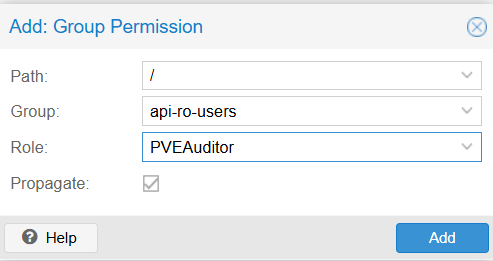
Then go to: Datacenter → Permissions
Add a Group Permission with these values:
- Path:
/ - Group:
api-ro-users - Role:
PVEAuditor - Propagate: enabled
Homepage setup guide recommedns PVEAuditor
Step 2: Create a dedicated API user
Go to: Datacenter → Permissions → Users
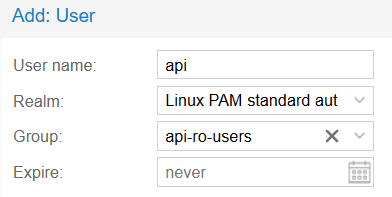
Create a user such as api@pam, and add it to the api-ro-users group. After creating it, make sure the user is enabled. A disabled user will cause API requests to fail with 401 user 'api@pam' is disabled, even if the token itself is correct. Proxmox token authentication is tied to the backing user account.
Step 3: Create the API token
Go to: Datacenter → Permissions → API Tokens
Click Add and use:
- User:
api - Token ID:
homepage
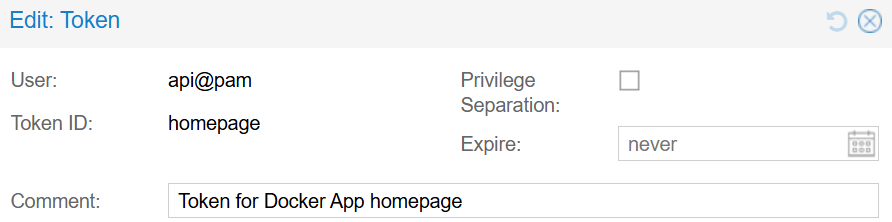
Important: in the Token ID field, enter only homepage, not api@pam!homepage. The combined format is only used later in Homepage config. Homepage’s docs show the final token as username@pam!Token ID.
Also make sure to uncheck Privilege Separation. See: Proxmox widget showing 0 values for VMS, LXC, CPU, MEM · gethomepage/homepage · Discussion #3681
Note: When Proxmox shows the token secret, copy it immediately and store it somewhere safe.
Step 4: Add token permissions
Now go back to: Datacenter → Permissions
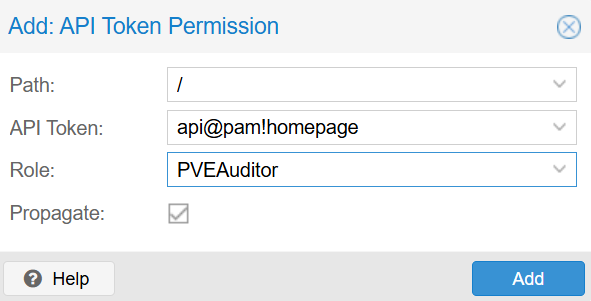
Add an API Token Permission with:
- Path:
/ - API Token:
api@pam!homepage - Role:
PVEAuditor - Propagate: enabled
Proxmox documents that tokens with separated privileges need explicit ACLs, and Homepage’s token guide includes this exact permission step.
Step 5: Configure Homepage
Homepage’s Proxmox widget uses:
username: the full token ID, likeapi@pam!homepagepassword: the token secreturl: your Proxmox base URL
    - ProxMox:
        icon: <icon>
        href: <click2open>
        siteMonitor: <ping url>
        widget:
            type: proxmox
            url: https://<URL>:8006
            username: api@pam!homepage
            password: <Secret Token>
            node: proxmox